
Get more from Kickstart.
Clear notes on Kickstart’s tools, what they’re for, and how to use them. Need support or want to get in touch? Contact Support.
Watch the introduction video See what you can do with Kickstart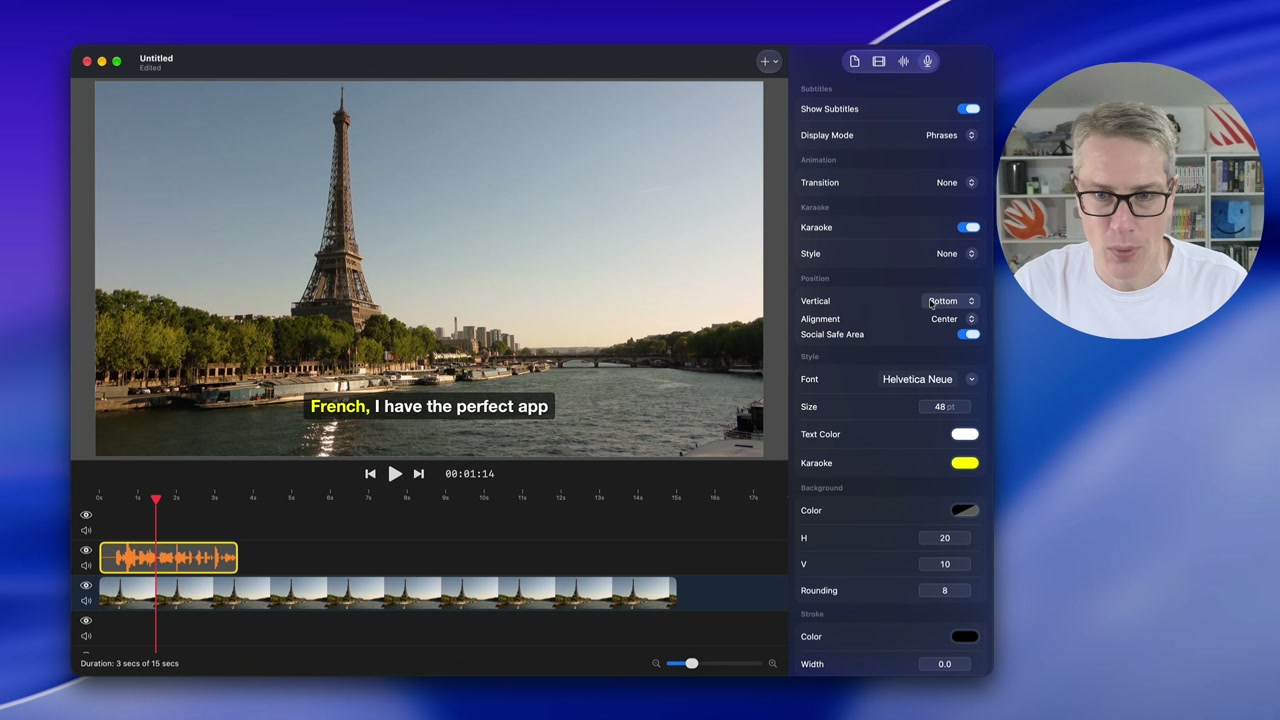
Project
Overview
See what needs attention today, then jump straight into the right activity.
Tasks
Turn launch and growth work into small jobs you can actually finish.
Journal
Keep a light record of what changed, what shipped, and what you learned.
Basic Information
Store the facts Kickstart uses when it writes, exports, and suggests work.
App Store
App Store
Tune your listing, product pages, events, offers, and store readiness.
Optimization
Review your App Store page and find practical ways to improve conversion.
Custom Product Pages
Plan targeted App Store pages for campaigns, audiences, and feature stories.
In-App Events
Draft App Store events for launches, updates, seasonal pushes, and big moments.
Editorial Nominations
Prepare focused nomination pitches for Apple editorial consideration.
Offer Codes
Create and organize promo codes with a clear purpose.
Accessibility
Prepare accurate App Store accessibility declarations before submission.
Localizations
Manage translated App Store metadata and focus on markets that matter.
Apple Ads
Inspect Apple Ads performance and find the campaign work worth doing.
Keywords
Keyword Tracker
Keep an eye on the keywords that matter after metadata or campaign changes.
Keyword Explorer
Find related keywords and build a stronger draft for your Store Listing.
Keyword Trends
Explore weekly App Store search trends by category and country.
Search Suggestions
Discover the phrases the App Store suggests and find new keywords to track.
Competitors
Competitors
Track apps in your space so your pricing, keywords, and positioning stay honest.
Comparison Table
Compare tracked competitors side by side.
Pricing Analysis
Compare competitor prices before changing your own.
Keyword Analysis
Inspect competitor keyword and positioning clues.
Search Rankings
Track where your app and competitors rank for important keywords.
Privacy Analysis
Compare privacy labels and the trust story your store page tells.
Competitor Screenshots
Review competitor screenshots and spot messaging patterns.
Competitor Reviews
Read competitor reviews to find repeated customer pain points.
Marketing
Marketing
Create practical launch material without turning your day into a content treadmill.
Do Just One Thing
Get one focused marketing action instead of a vague plan.
Build In Public
Draft specific social posts about what you are building, shipping, or learning.
Find a Community
Find places where your audience might already spend time.
Product Hunt
Prepare your launch pitch, assets, and first comment before launch day.
Video Hook Generator
Generate short video hooks for demos, launches, and feature clips.
Saved Video Scripts
Reopen generated scripts and turn the useful ones into real videos.
Press Kit Creator
Assemble the assets and facts journalists and creators need.
Email Pitch
Draft short, specific outreach emails for press and creators.
Video Editor
Turn screenshots, clips, captions, and hooks into short app promo videos.
Website Editor
Build and publish a focused app website from reusable sections.
Analytics
Analytics
Use sales, subscriptions, and App Analytics to pick the next useful move.
Big Picture
Review your app portfolio for the last 30 days and decide which project needs attention.
Revenue Details
See sales and revenue over time, then connect changes back to real work.
Subscriptions
Review subscription movement, trials, renewals, and cancellations.
Verified Monthly Revenue
Create a clean monthly revenue snapshot to share or save.
Purchasing Power Parity Calculator
Compare territory prices before changing global price points.
App Analytics
Inspect App Store funnel, engagement, territory, source, and crash reports.
Move One Number
Pick one metric to improve and choose a concrete first move.
Build
Build
Prepare releases, watch crashes, inspect builds, and test with less friction.
Release Checklists
Run repeatable checks before submitting or shipping.
Icon Editor
Make a clean development icon while your final artwork is still evolving.
Kickstart Overdrive
Use the companion menu bar app to inspect and control Simulator while you build.
TestFlight
Review builds, testers, feedback, and crashes before the release goes out.
Crashes
Check crash data and focus on the issues affecting real users.
Build Insights
Review build times and local Xcode cleanup opportunities.