
How to user test your app with just 5 people
Five testers, Apple’s three questions, and what to watch for in your tests.

Hand your app to one other person, watch them attempt a realistic task, and you’ll almost certainly learn a few things. But Jakob Nielsen’s five-user model teaches us that having five similar users performing similar tasks will reveal about 85% of the usability issues your app has – that’s a huge amount of feedback, with just five people.
If you want to test your app effectively, I’m going to show you how to run smart tests, what to ask, and what to watch for – and also the three questions Apple ask in their own tests.
You don’t need many users
Nielsen provides a model that breaks down roughly how many usability issues are found as you add more testers to a project. If you run the numbers, this is what you get:
- 1 similar user: About 31% of discoverable usability issues.
- 2 similar users: About 52%.
- 3 similar users: About 67%.
- 5 similar users: About 84%.
As you can see, the curve climbs fast but flattens quickly – adding more users helps less and less, which is why Nielsen recommends several small rounds rather than one larger study. (To be clear, this applies only when the participants and tasks are similar – if you serve different user groups such as novices and experts, or VoiceOver and sighted workflows, each group may need its own coverage.)
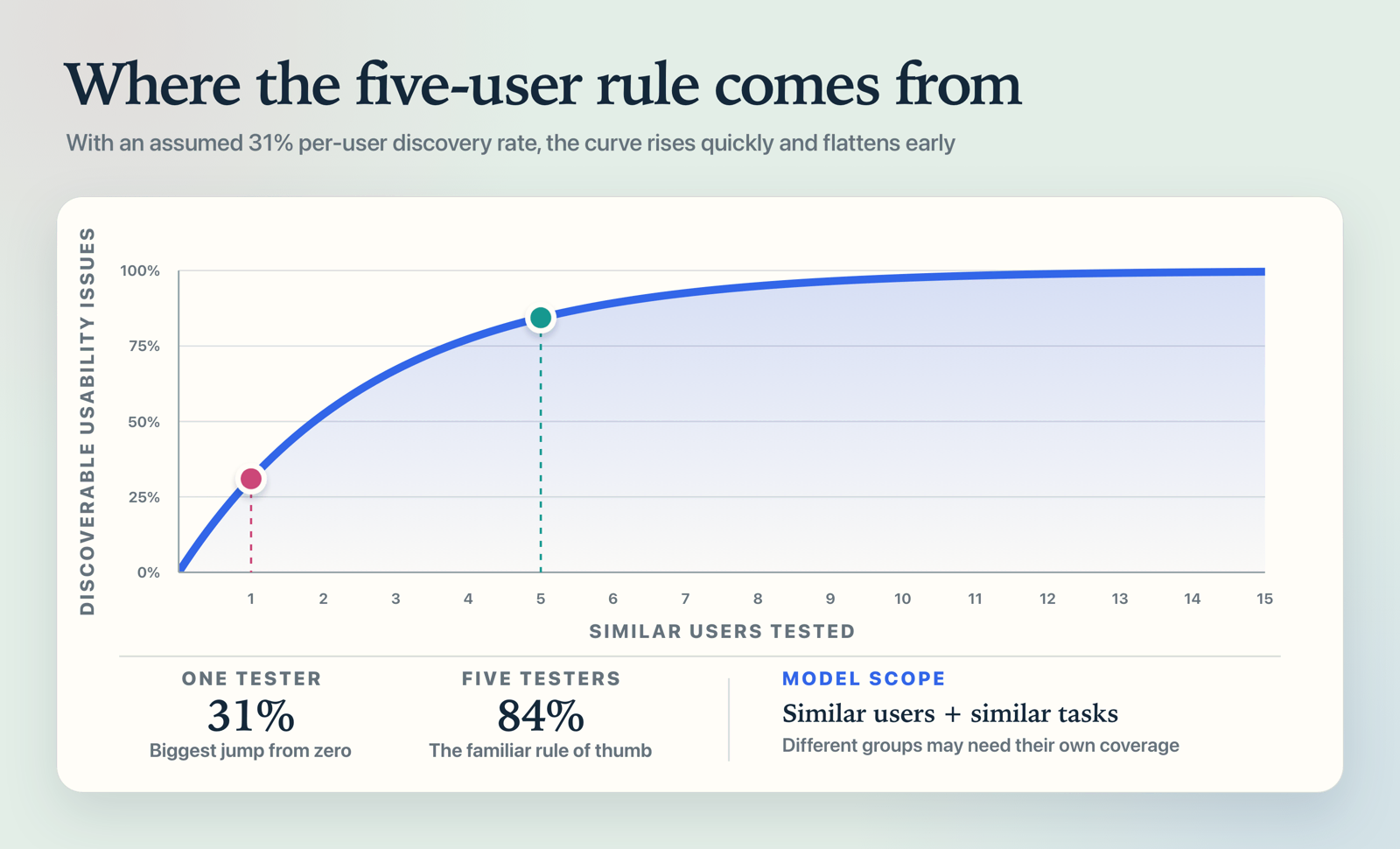
But the number that matters most isn’t five. It’s one. Here’s what Nielsen says:
“As soon as you collect data from a single test user, your insights shoot up and you have already learned almost a third of all there is to know about the usability of the design. The difference between zero and even a little bit of data is astounding.”
His claim dates back to 2000, but the practical point is still useful: even one external tester is better than none. Yes, a friend can help with your first test build or two, but them knowing you will bias what they say. Instead, try to recruit someone who actually resembles your target user whenever the decision is important.
Watching is the hard part
Here’s a warning in advance, just so you have chance to brace yourself: watching someone use your app can be genuinely painful.
If you ever saw the Square Hole Girl video, you already know the feeling – someone cheerfully pushing every shape through a child’s hole sorting toy, while an adult watches in increasing despair. If you haven’t seen it, give yourself a little treat and watch it here, because it’s exactly what early user testing feels like.
No amount of testing things yourself can catch some issues, because you know what everything is supposed to do. Instead, confusion only appears when someone who doesn’t know picks up your app, and even just 30 minutes with them will do wonders for you.
Apple’s three questions – and the three things you must never do
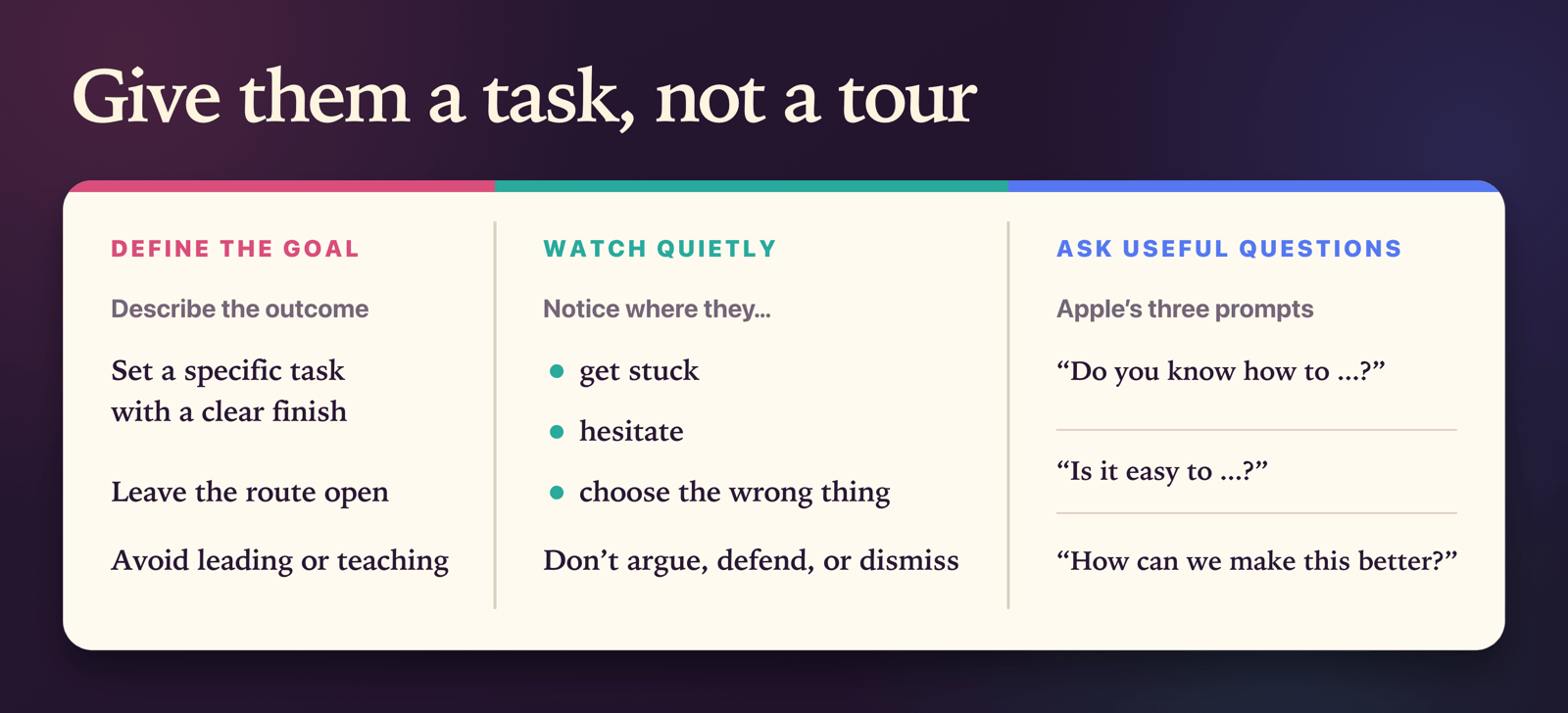
Back at WWDC14, Apple gave a talk called “Prototyping: Fake It Till You Make It” that is still the best half hour on this subject – watch it here. When they try a prototype with potential users, they ask three things:
- “Do you know how to XYZ?”
- “Is it easy to XYZ?”
- “How can we make this better?”
They don’t bother asking “do you like it?”, because that question only produces compliments – particularly from people who know you. The three questions above identify behavior: can they find it, can they do it, and what got in the way.
More importantly, Apple names the three things you must not do while watching: don’t argue, don’t defend, and don’t dismiss. Yes, I know this is the company that spawned the “you’re holding it wrong” meme, but the underlying point is spot on – if you argue with users, all you’ll do is make sure they never volunteer to help you again.
So try to sit quietly, and look for simple things:
- Where do they get stuck?
- Where do they choose the wrong thing?
- Where do they almost choose the wrong thing?
You’re looking for broad structural confidence here, not opinions on your color choices.
At the same time, you should definitely celebrate when they do the right thing, because that’s a good sign that you nailed the design. I asked Ryan McLeod, creator of the puzzle game Blackbox, about this, and I love how he framed it:
“I know something’s worth keeping when it encourages players to explore in the right corners of the room, so to speak – when they pick up on the answer but don’t quite get it, and it pokes at them just enough to stay under their skin.”
If your testers find their way to the right screen, it means they are comfortable exploring your app – and that alone is a great place to be.
Give them a task, not a tour
If “watch them use it” feels too unstructured for you, try setting a specific task and see how they get on:
- “Sign up for the app, then log your first workout.”
- “Add someone to your household and log their medication.”
- “Find a bedtime story suitable for a 9-year-old child.”
If possible, ask them to think out loud as they go: “Okay, I can see a + button, which I think means adding a new workout, so I’m going to press that now.” It’s a simple thing, but it can reveal how someone interprets the screen.
Malin Sundberg, who builds Mercury and Orbit with her partner Kai Dombrowski, told me about a lovely lightweight version of this:
“We call it the Two-Second Glance Test. Kai would show me the app for just a couple of seconds and ask, ‘What’s the forecast like?’ If I could quickly say what the current conditions were and what the week looked like, it passed!”
They knew glanceability was a core feature of their weather app, so that’s what they tested – just two seconds and one question.
What to do with what you find
Once you have feedback from real users, look to prioritize the big stuff first – consider how serious a problem is along with how often it happens, for example.
When you’ve written down all the issues that were found and carefully ordered them by severity and frequency, don’t jump straight into fixing them all. What you don’t want is a beautifully polished app that no one actually wants, so focus on what matters – focus your fixes on the parts that stopped people accomplishing your app’s core goal.
Here’s what Brian Mueller, creator of CARROT Weather, said about this:
“I’ve learned that it’s better to whip up something quick and see if it catches on instead of spending years making something perfect and full-featured and then having no one care about it.”
The flip side is that anything users uniformly praise deserves more of your time, even when it wasn’t what you expected.
Halide Mark II added a reduced-processing option in 2020, and four years later the team launched Process Zero, which captures a single raw image and applies minimal processing. “We were surprised by how many people loved it, and it lead to Process Zero,” Sebastiaan and Ben told me – that’s a whole feature grown from an unexpected response.
When you move from hallway tests to your first TestFlight, the problem flips from finding feedback to keeping up with it. I added TestFlight feedback to Kickstart precisely because I kept losing tester feedback – Apple’s web interface isn’t particularly friendly! But the point stays the same no matter the scale: work in small rounds, fix your app between rounds, and don’t argue with the data.
Stop reading, start doing
- Name one person who can try out your app this week, and put a time in your calendar.
- Write down one specific task for them, in the “sign up, then log your first workout” style.
- During the task, avoid leading or teaching. Observe, ask them to think aloud if it helps, then ask what they expected versus what actually happened.
- Afterwards, record how bad the bugs were and also how frequent, fix any blockers, and take hypotheses into the next round.
Don’t let yourself get stuck trying to find two dozen users who could help test your app – just get the five, and you’ll do fine.