
How to avoid App Store rejection: an App Review checklist
Apple rejected over 2 million App Store submissions last year – here are the mistakes that caused them, and the checklist that gets you through first time.

Apple rejected 2,093,244 app submissions last year. That’s not a scare number – it’s from Apple’s 2025 App Store Transparency Report, which counted 9,100,620 submissions reviewed. That works out to roughly 23 rejected submissions per 100 reviews, although one app can be submitted more than once.
But here’s something that should actually cheer you up: many rejections map to checks you can perform before submitting. For example, performance was the largest category in Apple’s report, covering issues such as crashes, bugs, and incomplete submissions. That doesn’t mean every rejection is simple, but it does at least give us a smart place to start looking.
Even after 15+ years of App Store shipping, my stomach still lurches when App Store Connect emails me mid-afternoon. But along the way I have learned that a checklist catches a surprising number of self-inflicted problems, so that’s what this post is: common rejection reasons and a hands-on checklist that reduces your risk.
Here’s where we’re going:
- Why apps actually get rejected – the real numbers
- App completeness: the tripwires
- Metadata mistakes that sink working apps
- Privacy: the fastest-growing rejection category
- Payments and purchases
- How to write review notes
- The reviewer run
- If you get rejected anyway
Why apps actually get rejected
Apple publishes a transparency report every year, and the most recent edition breaks rejections down by category:
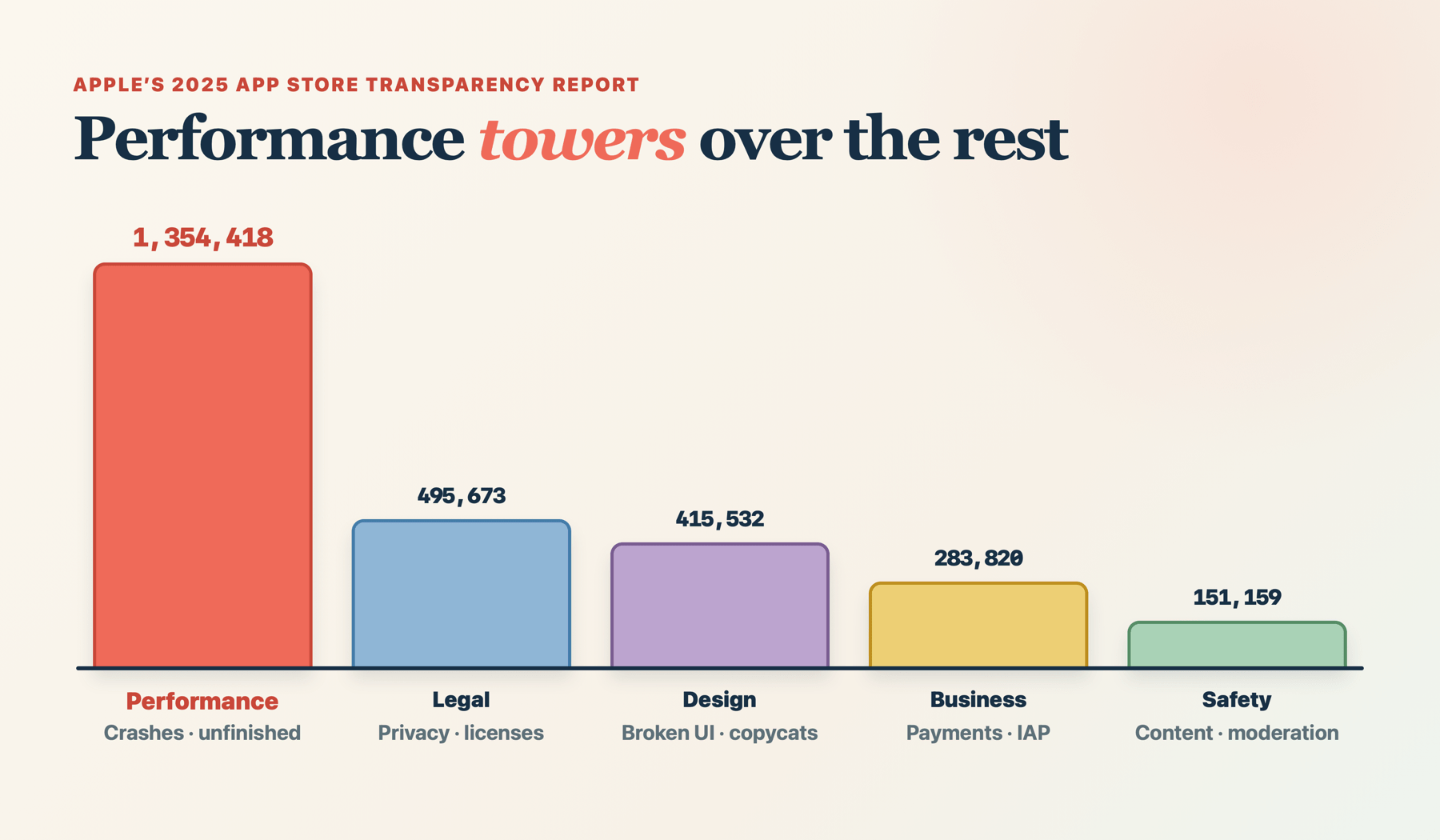
- Performance: 1,354,418 rejections – crashes, bugs, placeholder content, and any apps the reviewer couldn’t fully test.
- Legal: 495,673 – privacy problems, missing licenses, and data-handling violations.
- Design: 415,532 – broken UI, copycat apps, and interfaces that don’t work as advertised.
- Business: 283,820 – mostly in-app purchase and payment violations.
- Safety: 151,159 – objectionable content, user-generated content without moderation, and similar.
Sometimes apps get rejected under several guidelines at the same time, so those totals overlap a fair amount. However, performance is still a smart place to start, partly because it’s the single biggest category, but partly also because so much of it can be fixed before you submit.
There are two other numbers you should be aware of. First, Apple says 90% of submissions are reviewed in under 24 hours, but don’t plan for that because you might get something very different. Second, Apple’s transparency report says 387,087 rejected submissions got approved after a later submission, which offers hope for all of us.
Now, although there is an element of AI being used for automatic scanning, almost all App Review is done by humans, and humans are inconsistent. As a result, I’m not sure anyone can claim to know exactly what App Review will do doesn’t – the same binary can pass one week and fail the next. What you can do is remove every reason to say no, and that’s a game you can win.
App completeness: the tripwire that catches everyone
App Completeness sounds too obvious to be the top rejection reason, and yet here we are. It covers more than you’d think:
- Crashes and bugs. The reviewer runs your release build on current hardware and the latest OS. If it crashes on their device, it doesn’t matter that it worked on yours – unless you plan for every user to visit your house to use your app, that is.
- Placeholder content. Any filler text, any “coming soon” screen, or any sort of temporary artwork is an instant rejection, because it all signals the app isn’t finished.
- Broken links. Reviewers will open your support and privacy policy URLs, so take 10 seconds to ensure you typed them correctly.
- Dead backends. If your server is asleep or IP-restricted when the reviewer opens the app, the app “doesn’t work” as far as they are concerned. Review happens from Apple’s network rather than yours, so make sure staging restrictions don’t apply to production.
- Login walls with no way in. If your app needs an account, you must provide a demo account or a full demo mode.
It’s a boring list, but that’s kind of the point. The top rejection category on the App Store is boring, and has equally boring fixes: test your app on real devices, click your own links, and log in with your demo account before you submit.
Also worth knowing: since April 28, 2026, uploads to App Store Connect must be built with Xcode 26 or later using the iOS 26, iPadOS 26, tvOS 26, visionOS 26, or watchOS 26 SDK.
Metadata mistakes that sink perfectly good apps
There are various metadata problems, where working apps get rejected for what’s written around them:
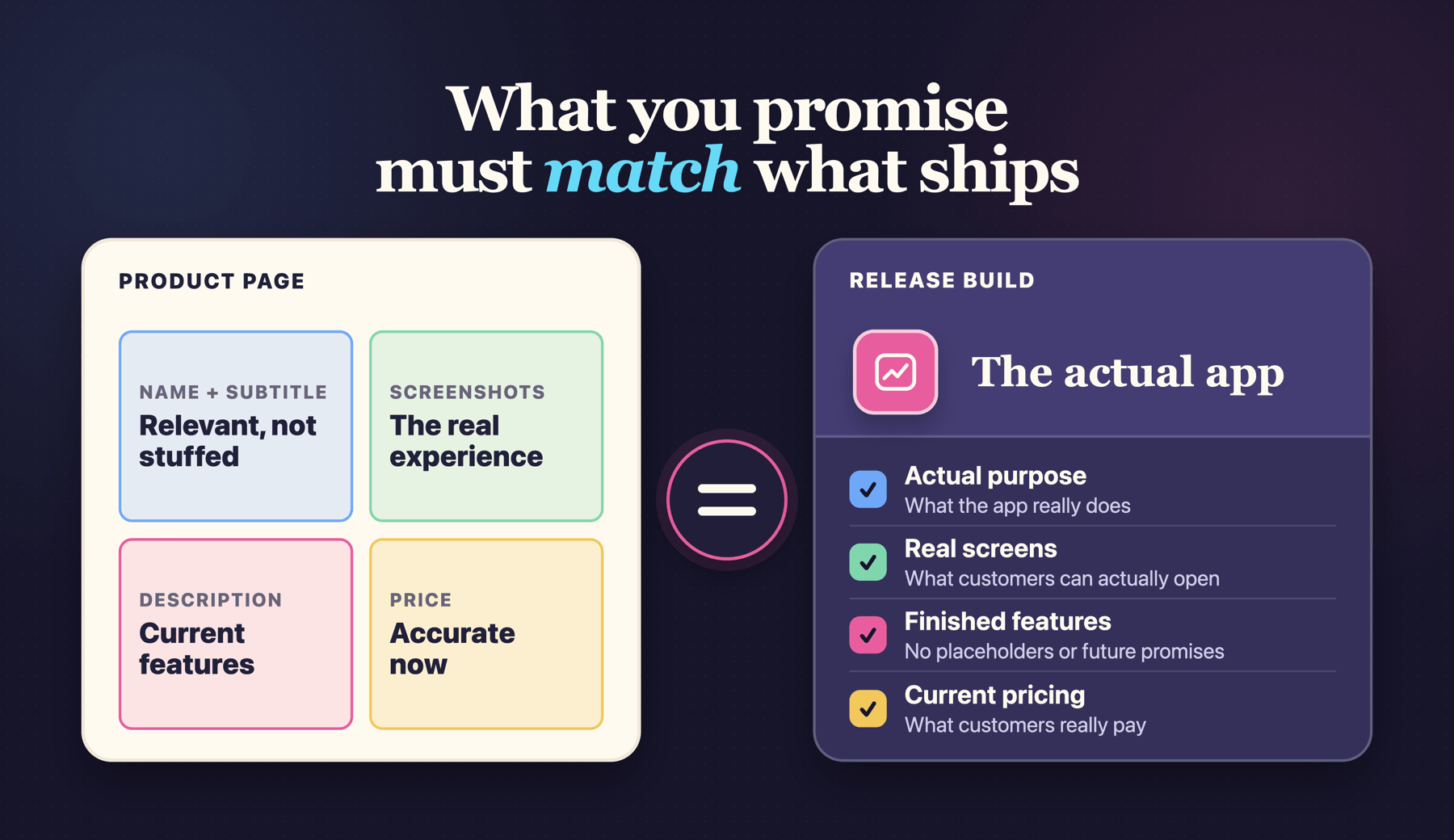
- Screenshots that don’t match the app. Screenshots need to show the app as it actually is, on the right device type. Concept art or mockups can all get flagged.
- Product pages showing another platform. Apple’s review guidelines say the app must focus on the Apple platforms it supports and not include names or images of other platforms unless it has specific interactive functionality.
- Shipping unfinished code. Things like placeholder content, incomplete features, and test builds belong in TestFlight rather than the App Store. (Particularly important as I write this: always be careful of mentioning upcoming Apple releases in What’s New, such as iOS 27!)
- Keyword stuffing. Trying to squeeze trademarked competitor names or other irrelevant terms into your name, subtitle, or keyword field is a common rejection, and might not even work. I’ve written an exhaustive guide to choosing App Store keywords without tricks.
The metadata rules all boil down to one sentence: everything on your product page must be true, current, and about this app on this platform.
Privacy: the category that keeps growing
Last year’s second-biggest category of rejections was for legal problems, privacy seems to be most of it. Here the problems include:
- Vague purpose strings. Every permission prompt needs a description that says why it’s needed. Saying “this app uses the camera” won’t fly, whereas “scans your paper receipts so you don’t have to type them in” is clearer and better. Write them like a human explaining themselves, because that’s literally what they are.
- Privacy policy problems. You need a policy that matches the data your app collects, and your privacy nutrition label must agree with it.
- Missing account deletion. If users are able to create an account in your app, they must be able to delete it in your app too. This has been required since 2022 and still catches people out.
- Third-party AI without consent. Since the guideline update last year, sending personal data to a third-party AI service must be disclosed and have explicit permission. (I imagine the iOS 27 Private Cloud Compute upgrade for Foundation Models is exempt from this?)
Don’t forget that any third-party SDKs on Apple’s “commonly used” list need to have privacy manifest files – missing that can end your build during processing, before it’s even close to review.
Payments and purchases
Apple’s payment rules are short and straight to the point: items consumed in the app must use in-app purchase, whereas things outside the app (buying coffee, ordering an Uber, etc) can use regular payment methods instead.
The tripwires here are:
- If you have a subscription, make sure your paywall shows the price, duration, and what’s included before users press the purchase button.
- If you sell restorable in-app purchases, provide the working restore mechanism Apple requires – this is trivial in StoreKit 2, and often done automatically. Consumables are not restorable.
- IAPs must be submitted for review with the build and actually work in the sandbox. (This is one I forget pretty much every time I launch a new app.)
The rules on linking out to external purchases have shifted around repeatedly over the past couple of years, and also vary by region – what’s allowed in the US might not be allowed in the EU, for example. So, if your business model depends on external payments, please read the latest guidelines the week you submit rather than trusting any blog post – including this one!
How to write review notes that actually help
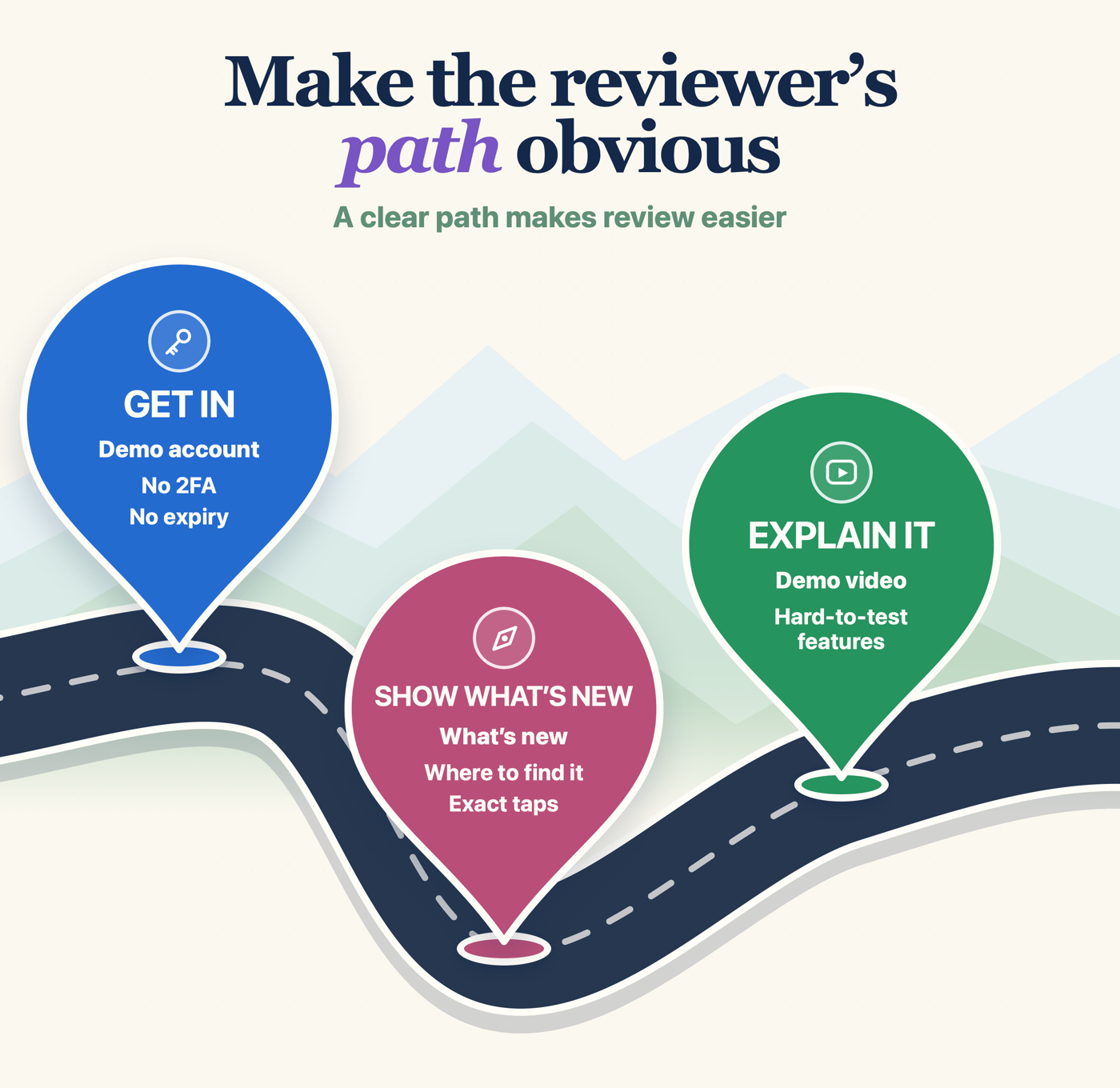
Here’s the thinking that changed how I submit: your reviewer has minutes, not hours, and they’ve never seen your app before. The App Review Information box in App Store Connect is your one chance to be the submission that’s easy to approve.
Good review notes get the reviewer in, point them at what’s new or unusual, and preempt the questions that would otherwise become a rejection. Here’s a template you can copy:
Demo account: demo@example.com / [password] – I preloaded this account with lots of sample data so all charts have content.
Premium features: Go to Settings > Upgrade. The demo account has a subscription in place, so you can test the premium screens.
[Feature that needs explaining]: This app connects to [hardware/service]. Here’s a demo video showing how it all looks: [link].
If your app only works in certain countries, say so and explain how the reviewer can test it from California. And if anything requires licenses or approvals such as gambling, VPN, or medical apps, attach the documentation up front, because they will ask.
Don’t forget to check your demo account works the day you submit: make sure it doesn’t require special authentication, and never let it expire in the middle of a review.
The reviewer run
Before you press submit, do exactly what the reviewer will do, on a clean device or simulator:
- Install the release build, so you’re exactly matching the reviewer.
- Launch the app and complete your core flow as a brand-new user would.
- Try logging in using the demo account you provided, copied directly from your review notes.
- Tap restore purchases. Open the privacy policy link. Open the support link.
- If you have accounts, try deleting one in the app.
- Trigger every permission prompt, reading each purpose string as if a stranger wrote it.
This kind of thing really belongs on your release checklist – it might only be six steps, but forgetting one will cost you days of waiting.
Obviously I’m biased here: Kickstart, my Mac app for the marketing side of shipping, has release checklists built in precisely because I kept re-learning these steps the painful way. But a note on your desk works too – the point is that it’s written down somewhere that isn’t your head.
If you get rejected anyway
It’s possible to get rejected even when you’ve done everything right – maybe it’s because a guideline gets interpreted differently between reviewers, or because a new reviewer wasn’t able to reproduce your flow, or maybe it was plain old bad luck.
Earlier I mentioned that last year 387,087 rejected submissions got approved after fixes, which means:
- Read the rejection properly. It will list specific guidelines that were broken, and usually includes screenshots too. Half the battle is understanding what they actually saw, and once your immediate annoyance has faded you’ll usually find they give specific advice.
- Reply before you resubmit. You can respond to App Review directly in App Store Connect. If they misunderstood something, a polite, specific reply – “that screen appears after tapping X; here’s a video” – often resolves it without code changes.
- Appeal when you’re right, once. If you genuinely believe the rejection misapplies a guideline, appeal it with the specific guideline text and why you comply. (Advance warning: winning an appeal isn’t easy.)
- Don’t try to argue in the resubmission notes. The reviewer isn’t your enemy, so fix the problem, add an explanation, and resubmit.
If you get rejected close to a launch date with a genuine time-critical need, Apple lets you request an expedited review.
Stop reading, start doing
- Open your support URL and privacy policy URL right now. If either is broken, you have just saved yourself a rejection.
- Log in with your demo account and check it has real data.
- Write your review notes using the template above – maybe ten minutes, tops.
- Book 30 minutes before your next submission for the reviewer run on a clean device.
Do those four things and you have removed several common, avoidable reasons for a rejection.