
When to call requestReview(): Apple’s rules and the timing that works
Apple limits how often review prompts appear and now gives clear guidance for using them – here’s how to ask respectfully after a meaningful success.

When should you ask users to review your app? The answer is pretty easy: not in your onboarding, not after someone has used your app for a week, and never on launch. Instead, the best time is immediately after they’ve experienced the value your app exists to provide.
Apple gives you only a handful of chances to ask for a rating, and the system might ignore your request entirely – if you waste those opportunities, they aren’t coming back. Time it well, though, and you can steadily grow your App Store ratings without annoying your users, and high App Store ratings are one of the most powerful ASO signals out there.
In this article you’ll learn what Apple’s latest guidance says, which APIs to use in 2026, and how to choose a review prompt that feels like a celebration rather than an interruption.
Apple’s rules, in brief
Everything Apple enforces here comes from three places: the Human Interface Guidelines for ratings and reviews, the App Review Guidelines, and the API documentation itself. The hard limit is that the system will show your prompt at most three times in any 365-day period, per user – and one rule deserves quoting exactly, because the App Review Guidelines are blunt about it: “Use the provided API to prompt users to review your app… we will disallow custom review prompts.”
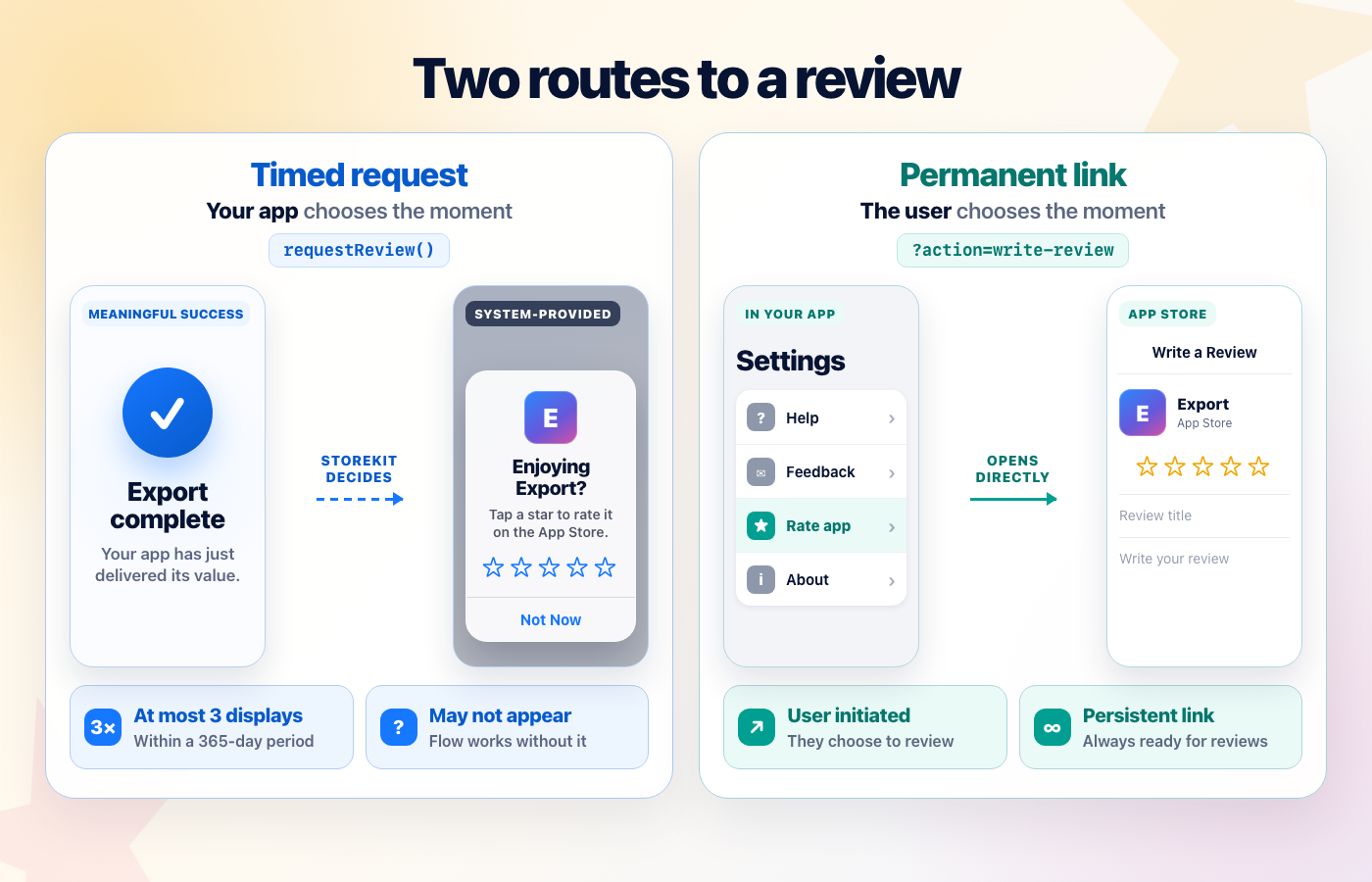
That ban has a practical edge people miss: calling the API is a request, not a command, so never wire it to a “Write a review” button or similar – the system decides whether anything appears, and a button that often does nothing is a broken button. Design your timing so nothing breaks if no prompt shows, because often it won’t.
That’s the compliance side. The rest of this post is the part Apple doesn’t write down: how to choose a moment when someone has enough experience to give a useful rating.
What Apple actually changed
For years the official guidance on review prompts was scattered across StoreKit documentation. In April 2026 Apple’s design team published proper Human Interface Guidelines for ratings and reviews, and the language is unusually direct: “avoid pestering people,” because repeated requests are irritating and can make people think less of your app.
The specifics worth knowing:
- Leave at least a week or two between requests, and only re-ask after additional engagement – after the user gets additional success with your app, such as completing more levels, or tracking more workouts.
- Always prefer the system prompt on iOS, iPadOS, and macOS – it’s consistent, it’s dismissible with one tap, and it checks whether the person has already left feedback before showing anything.
- People can now switch off in-app rating prompts globally, for every app they have installed – on iOS it’s in Settings > Apps > App Store.
Please just pause for a moment and think about that last one: Apple built a system-wide “never ask me again” switch because enough apps pestered enough people that the platform needed one. Every badly timed prompt in any app makes that switch more popular, and once someone flips it, your perfectly timed request will never be seen. We are all sharing one pool of user patience here, so please spend it carefully.
The App Review Guidelines add the harder edges: you must not force anyone to rate or review your app to unlock functionality, and manipulated feedback of any kind – paid, incentivized, filtered, or fake – can get you expelled from the program entirely.
The API to call in 2026
If you’ve been shipping for a while, your review-request code has probably survived two API generations. Here’s where things stand now:
SKStoreReviewControlleris deprecated as of iOS 18. It still works, but it’s on the way out.- UIKit and AppKit apps should call StoreKit’s
AppStore.requestReview(in:), passing the current scene. - SwiftUI apps get the nicest version: a
requestReviewenvironment action, available since iOS 16 and macOS 13.
The SwiftUI form looks like this:
import StoreKit
import SwiftUI

struct ExportCompleteView: View {
    @Environment(\.requestReview) private var requestReview

    var body: some View {
        Label("Export complete", systemImage: "checkmark.circle")
            .task {
                try? await Task.sleep(for: .seconds(2))
                requestReview()
            }
    }
}
Calling requestReview() tells the system you’d like to show the prompt; whether it appears is entirely up to StoreKit. That’s why the docs and I will both tell you the same thing: never make the prompt part of your UI flow, never wait on it, and never say “please leave us a review!” in your own interface right before calling it – if the system stays silent, you look broken.
Two more behaviors that catch people out during testing:
- In development builds, the prompt shows every single time you call the API, which makes new developers wildly overestimate how often real users see it.
- In TestFlight, the call does nothing at all. It’s not broken, it’s just disabled there.
And for the person who wants to leave a review – say, from a “Rate this app” item in your settings screen – skip the prompt entirely and deep link straight to the App Store’s review sheet: https://apps.apple.com/app/idXXXXXXXXXX?action=write-review. That takes them to the App Store rather than relying on the in-app system prompt.
The timing that works
We might not get to determine the design of the review prompt, but we can determine when to show it, and honestly that’s the most important thing.
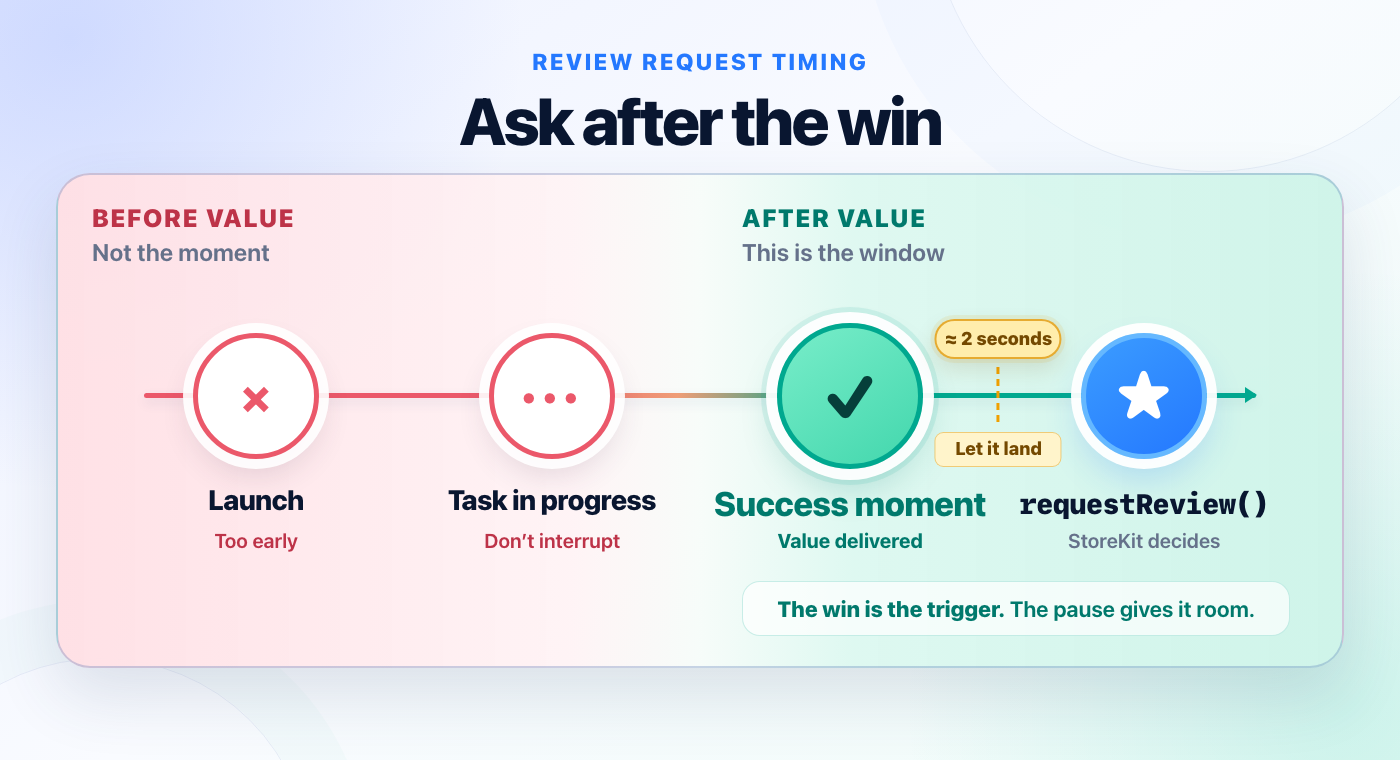
The rule here is delightfully simple: put the request on your app’s critical path, immediately after the moment your app delivers its core value. Not near it. After it.
Jacob Bartlett wrote up the timing used in two of his own apps: Carbn asked five seconds into its carbon-footprint animation, while Aviator asked about twenty seconds after its “wow moment” – the point where users think, “yes, this app is what I want.” His reasoning is the useful part: ask when the person has just experienced the value of the app.
So the recipe looks like this:
- Find your app’s “aha!” moment. The workout saved, the invoice sent, the photo exported, the level beaten, etc. It must be their success, not yours – “user opened the app 10 times” is your metric, not their moment.
- Require the win to have happened more than once. Three successes is a sensible starting policy, not an Apple rule; change it to fit the rhythm of your app.
- Add a small delay after the win, so your success UI lands first and the prompt doesn’t stomp on it. Two seconds is a starting point, not a conversion trick.
- Ask at most once per app version, with a date gate too. Rapid releases can be much closer together than Apple’s suggested week or two, so version alone is not enough.
Here’s all of that in one SwiftUI-friendly shape:
import StoreKit
import SwiftUI

struct EditorView: View {
    @Environment(\.requestReview) var requestReview
    @AppStorage("completedExports") var completedExports = 0
    @AppStorage("lastVersionAsked") var lastVersionAsked = ""

    let currentVersion = Bundle.main.object(forInfoDictionaryKey: "CFBundleShortVersionString") as? String ?? "1.0"

    func exportFinished() {
        completedExports += 1

        guard completedExports >= 3, lastVersionAsked != currentVersion else { return }

        Task {
            try? await Task.sleep(for: .seconds(2))
            requestReview()
            lastVersionAsked = currentVersion
        }
    }
}
Adjust the threshold and trigger for your app, and add a persisted date check before using this in production. The important shape is a counter for meaningful wins, spacing between requests, a short delay that lets your success UI finish, then the request.
And the anti-patterns, because Apple’s new guidance calls out most of them by name:
- Don’t ask on launch. The person hasn’t done anything yet; you’re interrupting their intent, not celebrating their success.
- Don’t ask mid-task. A prompt during data entry or playback is basically a request for a 1-star rating.
- Don’t ask right after a failure, a crash recovery, or a paywall dismissal. You’re pretty much asking “how are we doing?” at the precise moment the answer is that users are unhappy.
- Don’t re-ask the moment the system lets you. Three per 365 days is a ceiling, not a target.
If you place the request somewhere else because it’s easier, it doesn’t guarantee your ratings will be bad, but you’ll probably find they are a bit thin on the ground – most people quite reasonably dismiss the prompt without thinking. That’s the real cost of bad timing: not necessarily angry reviews, but a request made before someone has enough experience to answer well.
Growth hack or shady pattern?
There are a couple of growth hacks you might see around, and while they might have been true for a while they aren’t any more – Apple is cracking down hard, and we’re seeing increasing app rejections when developers abuse the reviews system.
First, presenting a review prompt towards the end of onboarding, often pitched more as “help support the app” rather than “write a review.” This was fairly common until early 2026, but now you’re running the risk of rejection by App Review because users clearly haven’t seen the value of your app.
The other pattern is more subtle, and slightly more of a gray area: a pre-prompt asks whether you’re happy, where happy people get sent to the review prompt, and unhappy people get sent to a feedback form. This was even more common than onboarding requests, but it is technically review gating and Apple’s latest guidance against filtered feedback is aimed straight at it. If you’re in any doubt about how they feel, don’t ask for a review – wait until you collect more evidence that they are actually happy.
One thing prompts can’t do for you is tell you what happened next. Unless you have the App Store Connect app configured to notify you of individual reviews, you’ll find that ratings arrive silently, region by region, and a 1-star review in Germany won’t be obvious. This is a place where tooling genuinely helps – sites like Appfigures monitor reviews well, and I built Kickstart’s review management system because I wanted new reviews across every region in one inbox where I could actually respond to them.
Stop reading, start doing
- Search your project for
SKStoreReviewController– if it’s there, migrate toAppStore.requestReview(in:)or the SwiftUI environment action today. - Write down your app’s single biggest win moment, then check where your review request actually fires. If those two places aren’t next to each other, move the call.
- Add the counter, the version gate, and the two-second delay from the code above.
- Add a “Rate this app” item in settings using the
?action=write-reviewdeep link, so motivated fans never need to wait for a prompt.
Ask right after someone wins, then let StoreKit decide whether the prompt appears.