
App Store offer codes: How to track campaigns, win back subscribers, and grow your app
Apple offer codes can associate redemption activity with a campaign. Here’s how subscription and in-app purchase codes differ, and how to distribute them safely.

Apple’s App Store offer codes might seem like just a way to give away subscriptions or in-app purchases for free, but they are also an incredibly effective app marketing channel when used wisely. By creating distinct offers for press, creators, testers, win-back campaigns, and other audiences, you can use App Store Connect to track which campaigns drive redemptions and sales, then compare what actually works.
In short: think of App Store offer codes as a marketing channel, not just a discount.
You’ll already know that Apple lets developers create large batches of offer codes and report sales against an offer reference name. The exact quota depends on what you use: subscription codes are shared across your app’s subscriptions, while in-app purchase codes are shared across its other in-app purchases.
That much is fairly obvious, but don’t forget that every offer has a reference name, and Apple’s reports can associate redemption activity or sales with that name. When each offer is used for one specific audience you can identify at a glance, reporting by offer lets you compare campaigns in under a minute and really see what’s working for you.
I’ll walk through all that and more, but first let’s just check off the basics…
The basics: code types, limits, and eligibility
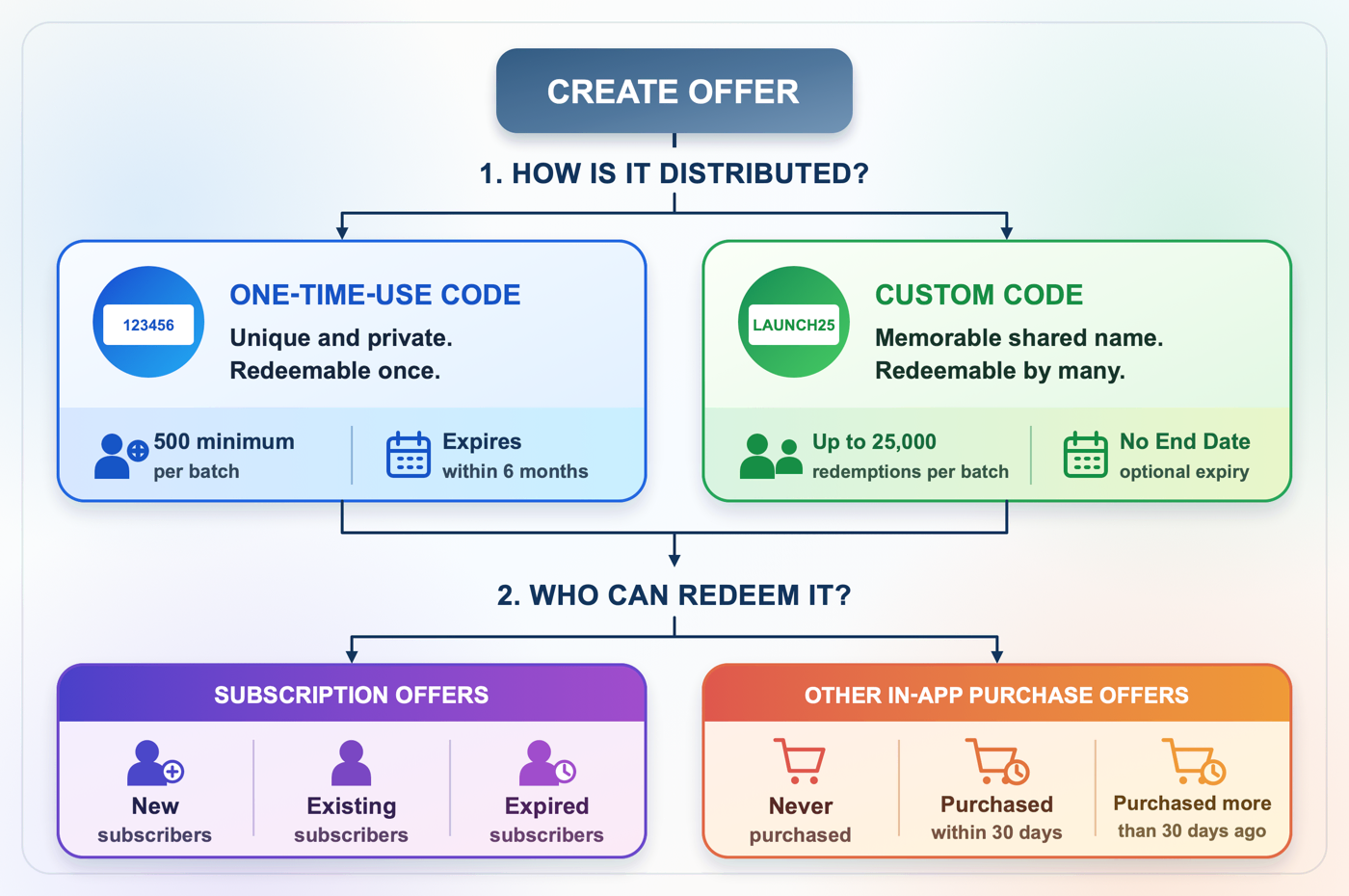
Offer codes let people get in-app purchases free or discounted, but Apple documents subscription offer codes separately from offer codes for consumables, non-consumables, and non-renewing subscriptions. Both systems provide two production code types:
- One-time use codes are unique random strings, generated in batches of 500 to 25,000. Each code works exactly once, and they must expire within 6 months.
- Custom codes are names chosen by up to 64 characters in length, such as
LAUNCHWEEKorPODCASTNAME, and can be redeemed by as many users as you want.
There are some limits to be aware of: subscription codes allow up to one million redemptions per app per quarter, shared across subscriptions, whereas other in-app purchases allow up to ten active offers and one million codes per app per quarter, shared across those purchases.
One-time-use production batches vary from 500 to 25,000 codes and expire within six months; custom codes also have a redemption cap of up to 25,000 per batch, but expiry is optional. Technically codes can take up to an hour after creation before they work, but I’ve found they normally work pretty much immediately.
You also have control over eligibility, which is where things get interesting from a marketing perspective: subscription offers can be limited to new, existing, or expired subscribers, and in-app purchase offers to people who’ve never purchased, purchased in the last 30 days, or purchased more than 30 days ago. That last part is what makes win-back offers possible, as I’ll explain later.
Tip: You might find some older blog posts referring to in-app purchase promo codes, but [Apple retired those] ](https://developer.apple.com/news/?id=gf6mgrs6) in March 2026 in favor of offer codes. Paid-app promo codes remain a separate system, with their own four-week expiry and review restrictions.
The offer name is your tracking tag
App Store Connect asks for a reference name when you create an offer, and most developers type something like “Discount offer” and move on. And when you’re just starting out, I get it – these seem disposable. But trust me: give it a name you will recognize in reports.
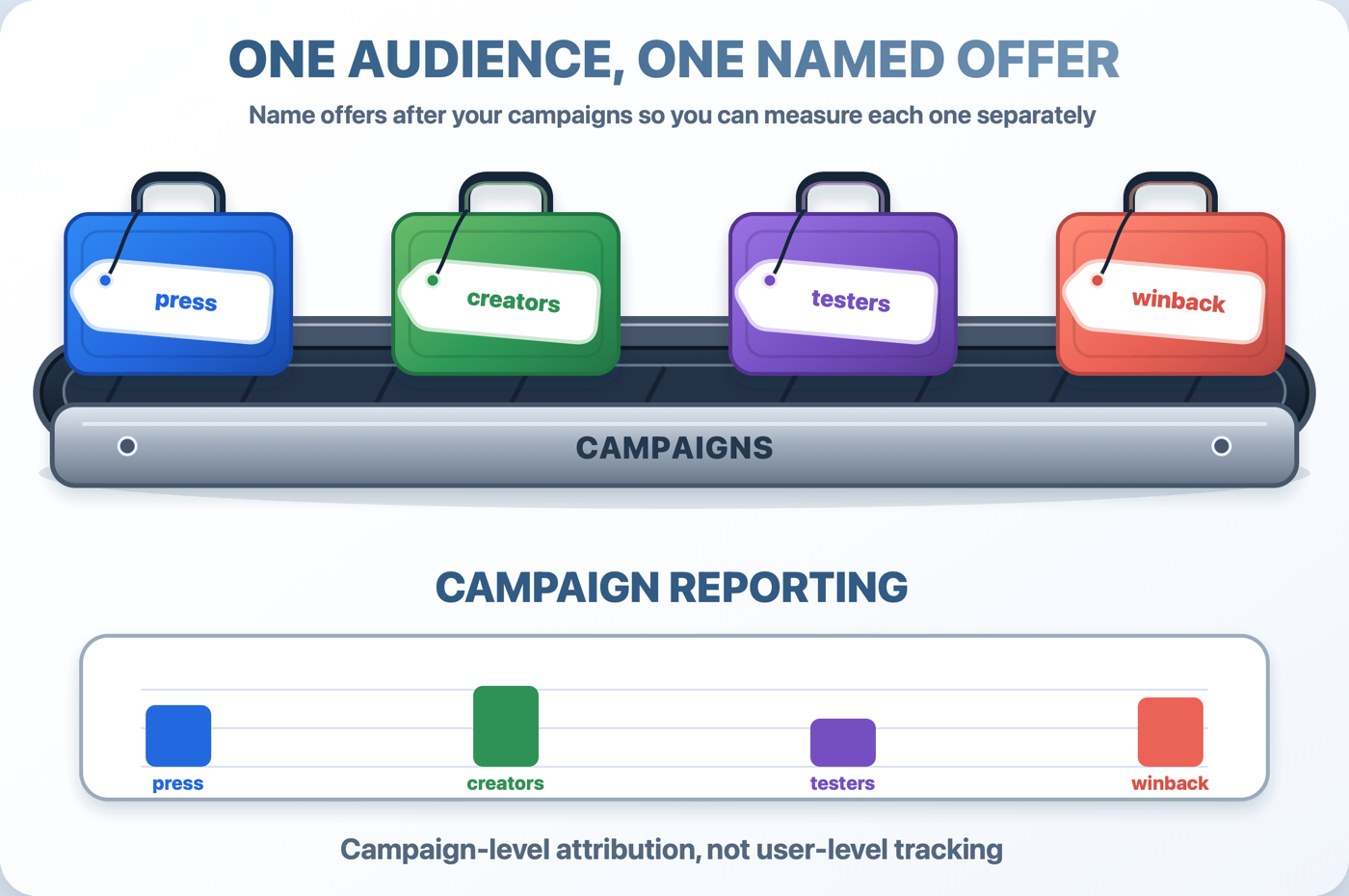
Here’s the trick: try to avoid creating one big offer and sharing its codes everywhere. Create one offer per audience – press-2026, creators-2026, testers-1.0, winback-spring, etc – then hand each audience only its own codes. App Store Connect reports directly associate redemption activity with your offer reference name, so when one campaign produces a spike you can see exactly which audience it came from.
I’ve always found this provides much more useful information than a simple impressions graph, because Apple’s reports can associate redemption activity directly with the campaign’s offer reference name.
Four audiences, four offers
So who gets codes? Here are four ideas to consider, with each one using a separate offer only when it fits your app’s audience:
Press can get one-time-use codes. When you pitch your app to a journalist, offer private access to your top tier. Generate the smallest number of codes you can, which is likely to be 500 (yes, I also wish there were a lower number here!), then send individual codes directly to journalists rather than publishing them in your press kit. (Also, just to set expectations: a redemption proves only that the code was used, not that the journalist tested the app or intends to cover it.)
Creators can get custom codes. Give a YouTuber or newsletter author a memorable code so you can clearly count redemptions. This is not the same as an affiliate link: it has no click tracking or commission, and it won’t measure viewers who saw the message but never redeemed. Important: if you provide free or discounted access, make sure you ask the creator to openly disclose that relationship.
Testers get one-time use codes. If there were particular people who really helped shape your app’s development, you can send them a free year as a small thank you. A code in your farewell TestFlight message helps to convert your most engaged testers into premium-tier users at exactly the moment you’d otherwise lose them, and they might become paying users in the future.
Lapsed subscribers can get a win-back offer. Create an offer limited to expired subscribers, then present it clearly to qualifying users. You might also have an opt-in email list or users who consented to marketing messages through push notifications, both of which can be useful – just remember to have a clear unsubscribe path for both.
Notice what’s missing here: “post a giant discount code on social media and hope.” That’s the one use everyone defaults to, and it’s less directly useful than the alternatives listed above – you don’t get any sort of targeting and you also risk codes being leaked to deal-aggregator sites within hours. If your goal is just to reach some early users then this is a viable choice, but for more mature apps you should definitely explore the other options first.
The gotchas Apple’s docs bury
There are a handful of places where most people seem to screw up offer codes. I hit these same traps, so this is me talking from experience, and it’s your chance to learn from my screw ups:
- Custom codes can’t be typed into the App Store’s redeem screen. Only one-time use codes work there – custom codes need your redemption URL or some sort of in-app redemption sheet. So, make sure you put the full link in everything you send.
- Send the redemption URL, not only the code. It looks like
https://apps.apple.com/redeem?ctx=offercodes&id=YOUR_APP_ID&code=YOURCODE, and people who don’t have your app get prompted to download it first. Don’t make redeeming your code hard! - In-app redemption needs code. Apple provides the (extremely new, and terribly documented
offerCodeRedemption(options:isPresented:onCompletion:)for apps targeting iOS 27 or later, but there’s alsoofferCodeRedemption(isPresented:onCompletion:)for those targeting earlier releases. - Offer configuration can’t be edited after creation. If your eligibility settings need to change, you need to create a new offer. Deactivated, unredeemed codes expire without being added back to your quarterly limit, which is presumably one of the reasons the limits are so high these days. Custom-code batches are different: you can extend a code’s availability by creating another batch with the same custom code.
- One-time-use codes must expire within six months. Custom codes for subscriptions and other in-app purchases can use No End Date. If you give a custom code an expiration date, set a reminder for yourself to extend or replace it, particularly if that code was used by a creator somewhere – if that expires potential users will just hit an error screen with your app’s name on it.
Take a moment to be honest with yourself, because managing all that work across several audiences is the kind of thing most developers just won’t do – or at least not after week one!
So, when I built my Kickstart app I added an Offer Codes section for exactly this. Kickstart talks to the App Store Connect API so you can create offers, select countries, decide who should be eligibile, generate all your codes, and even copy them (including ready-made redemption links!) straight to the clipboard or a CSV. But whether you use it or raw App Store Connect, the audiences-and-naming system above is the key – just do something with them, even if that is just posting them on your social media.
Reading the results
Once each audience has its own offer, it’s time to read the results. Here I recommend you start by reading the redemptions per offer, and try to look beyond the first figure you see. For subscriptions, you want to balance conversion, retention, returns, and overall proceeds, and you should choose checkpoints that match your subscription period.
Be careful when comparing these audiences, because when dealing with small numbers – particularly if they are self-selected – things can look dramatically different just by chance.
You should also watch out for an important second-order effect here: a creator whose code gets 400 redemptions followed by lots of churn will end up being a worse partner than one with 80 redemptions that produce better conversion and retention. Yes, this is why I strongly encourage you to create separate offer codes – you need to be able to distinguish between these two results Apple’s offer reporting.
Even if you’re just starting out, you can still do something – just create one custom code named after the next podcast, newsletter, or creator you’re talking to, then put the redemption link in the message you were hoping to send anyway. It costs you nothing, and any resulting activity will be associated with that offer in reporting.
Stop reading, start doing
- Pick a single audience and one goal, then create an offer with a reference name that includes the audience and today’s date. If you do nothing else but this, you’ll still be ahead.
- Create either a small one-time batch or a limited custom code, and send it out manually wherever it’s needed.
- Add (and test!) the appropriate current offer-code redemption API before telling customers to use it in-app. (Good luck with Apple’s documentation here 🫠)
- Record all the codes issued, plus their redemptions, how well they converted to paid, and also (in the longer term) how many renewed, and also balance all that by the subscription duration and net proceeds. In short, try to judge them on more than pure uptake!